Pin your most-saved domains to the top of the dashboard for quick filtering. Click the pin icon next to Inbox and Archive, choose up to three domains, and see the favicons for each domain pinned to the header. Pinned domains are great for keeping tabs on your favorite sources like YouTube, X, or any site you save from regularly.
Raycast extension
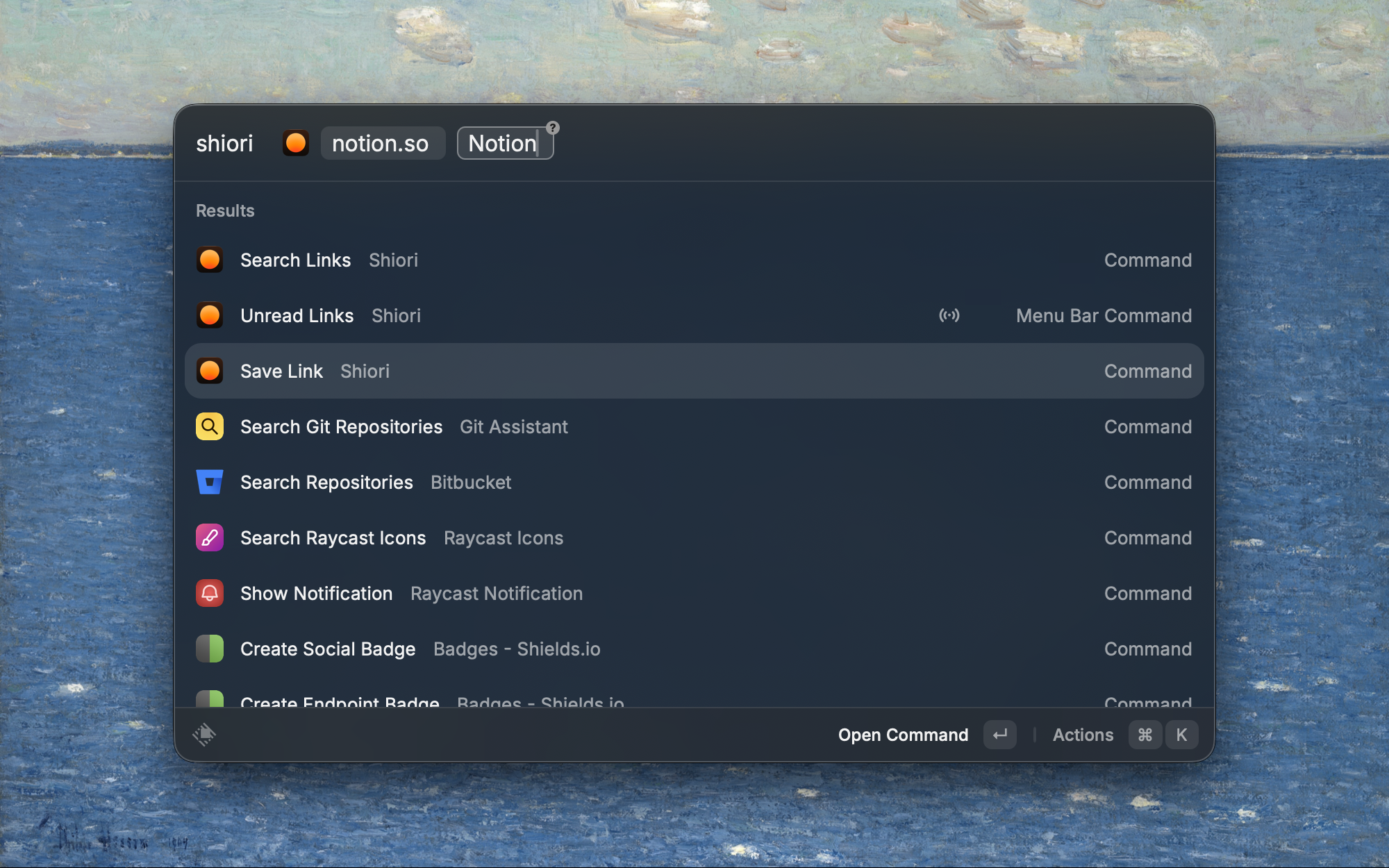
Save and search your Shiori library directly from Raycast. The new Raycast extension lets you save the current browser tab, search your library, and open links — all without leaving your keyboard. Install it from the Raycast Store.
Pro plan pricing
Shiori Pro is now $10/month. Pro users get 500 "Smart Save" credits per month, in addition to all the other existing Pro features like X bookmarks sync, Notion sync, email forwarding, feed subscriptions, Tidy Up, and color themes.
Smart Save extracts rich content and summaries from your saved links, X bookmarks, PDFs, and forwarded emails. Smart Save also transcribes uploaded audio files and extracts transcripts from YouTube videos, when possible.
If you need more than 500 Smart Saves per month, purchase additional credit packs from Settings.
Quickly save links to Shiori from any Android app with the new Android share intent. To get started, install Shiori as a PWA from your browser: open Shiori in Chrome, look for the ••• menu and select "Add to homescreen". When the PWA is installed, you can use the native share sheet in Chrome, YouTube, Twitter, or any app to save links instantly.
Shiori MCP server
Connect Shiori to AI agents like Claude Desktop and Cursor with the new Shiori MCP server. Authorize once with OAuth and your AI assistant can search, save, and manage your links directly from the conversation.
Install the Shiori CLI to manage your links and subscriptions from the terminal. The CLI is also usable by any AI agent, perfect for using Claude Code or other coding agents to pull reference links or save helpful URLs you find during the course of building software.
To get started, run npm i -g @shiori-sh/cli in your terminal, and then shiori auth to sign in.
Run the --help command for any command to learn more about what's possible with the CLI.
Forward any email to your personal @inbox.shiori.sh address and it will be saved as a link with a beautiful reader view. Email forwarding is perfect for capturing newsletters you want to read or remember later.
To create your personal forwarding email, open the settings dialog in the Shiori dashboard and press the Generate email button. The Shiori email is private to you, so avoid sharing it.
Read the full guide to learn more about email forwarding and how to set up auto-forwarding with Gmail rules.
Subscribe to feeds
Shiori now auto-discovers RSS feeds and YouTube channels from links you save, making it easy to follow your favorite websites and creators. When a feed is discovered, click Subscribe in the preview card or overflow menu. New items published from that feed or channel are automatically saved to your library every four hours.
You can view and manage your subscriptions from the dashboard settings or through the CLI.
Usage-based billing for X enrichment and changelog
There's a new credit system for X/Twitter link enrichment: Pro subscribers get 200 free X enrichments per month, and you can purchase additional credit packs if you need more. Purchase credits if you want to backfill more of your X bookmarks, either by syncing in-app or saving through the Shiori API.
Safari Reading List import
macOS users can now bulk import their Safari Reading List into Shiori. Open Settings, select your Safari Bookmarks.plist file, preview the links, and import them all at once. Duplicate detection ensures you won't end up with copies of links you've already saved.
Notion sync and instant-setup
Notion sync is now a full one-way pipeline from Shiori to Notion. When you archive, edit, or delete a link in Shiori, the change is automatically pushed to the corresponding Notion page. You can also backfill your existing library to Notion with a single click from Settings. A new banner on the dashboard lets you know when your Notion database needs new properties, and you can push them with one click.
Notion API errors like rate limits and timeouts are now retried automatically instead of failing immediately.
You can now upload audio files to Shiori. Audio recordings are automatically transcribed, and the transcript becomes searchable, summarizable, and available as AI chat context — just like any other saved link.
Chat history
Chat threads are now saved automatically. You can return to previous conversations, pick up where you left off, and reference past threads. Each thread gets an auto-generated title so you can find it later.
I also fixed a bug where the AI chat would hallucinate the number of search results found, reduced the initial page size from 50 to 25 links for faster loading, and fixed database query timeouts that could slow down the link list.
Data export
You can now download a complete archive of your Shiori library — all your links, metadata, and uploaded files bundled into a single zip file. Your data is yours, and you can take it with you anytime.
PDF upload
You can now upload PDF files directly to Shiori. Drag and drop a PDF anywhere on the dashboard, or use the upload button in the "add link" popover. PDFs are stored securely, and the content is automatically extracted for AI search and summarization so you can chat with your PDFs just like any other saved link.
Uploaded files are deleted when you delete the link or your account.
Smarter AI chat: web search, follow-up suggestions, and hybrid search
AI chat can now search the web in real time. When your saved links don't have the answer, the assistant will look it up — and you can save any search result directly to your library with one click. After each response, the AI now suggests 2-3 follow-up questions as clickable buttons, making it easier to dig deeper into a saved link.
Search also got a major upgrade. I added hybrid search that combines keyword matching with semantic similarity, so exact terms like brand names, acronyms, and technical jargon are no longer missed by the AI. This uses full-text search fused with vector similarity so you get the best of both worlds.
Chat with your saved links
You can now select one or more saved links and include them as context in AI chat. Add links via hover buttons, right-click menus, bulk actions, or the keyboard shortcut (c). Selected links appear as animated chips above the chat input, and the AI prioritizes them when generating responses — so you can ask questions about specific articles, compare multiple links, or dig deeper into something you saved.
Pro features, YouTube retries, and X health tracking
AI-powered features like summaries and embeddings are now gated to Pro subscribers, along with daily rate limits to keep costs sustainable. When a YouTube transcript fetch fails during initial processing, Pro users now get automatic retries to ensure transcripts become available after temporary YouTube issues.
X bookmark sync now tracks connection health and surfaces failures directly in Settings. If your X connection encounters repeated errors, you'll see a warning with instructions to reconnect instead of bookmarks silently stopping.
Unified sign-in and desktop improvements
Signing into the desktop app or browser extension is now nearly instant if you're already logged into the web app. Instead of going through the full Google OAuth flow every time, Shiori detects your existing web session and transfers it automatically. You'll only see the Google sign-in screen if you're not already logged in on the web.
The Electron desktop app got several improvements: a new app icon designed for macOS Tahoe, silent background auto-updates that download in the background and prompt you only when ready to install, and a new dedicated download page at /download with links for every platform and browser extension.